Run your own WebSDR
PhantomSDR-Plus is built to be run by one radio amateur on one ordinary Linux computer — installed by a single script, kept on the air by its own watchdog, managed from a browser and updated with one command.
One script does it all
Nothing to prepare by hand — no dependency list, no Node.js to fetch, no OpenCL packages to hunt down. The installer runs in numbered steps, lists its questions up front and fences each one with a YOUR INPUT IS NEEDED banner.
- Installs every build dependency with your own package manager.
- Builds the backend, and the driver for the SDR you pick, with its udev rule.
- Opens
site_information.jsonfor your callsign, locator, hardware and antenna. - Builds the desktop and
/mobilepages and detects the right OpenCL provider. - Adds the admin panel, the FreeDV RADE decoder and the statistics server (each optional).
- Writes
install.txt: every step as OK / SKIPPED / PARTIAL / FAILED.
git clone --recursive https://github.com/sv1btl/PhantomSDR-Plus
cd PhantomSDR-Plus
chmod +x *.sh
./install.sh| System | Script |
|---|---|
| Ubuntu 22.04 / 24.04 / 26.04, Debian 12 / 13 | ./install.sh |
| Fedora | ./install_fedora.sh |
| Arch | ./install_arch.sh |
| openSUSE Tumbleweed | ./install_opensuse.sh |
Tested on air on Debian 12 and 13 and Ubuntu 22.04 and 24.04. Ubuntu 26.04, Arch and Tumbleweed are verified to build and start in containers.
Bring the SDR you have
IQ or real sampling, from a 2 MHz RTL stick to 70 MS/s direct sampling of the whole HF spectrum. A setup script adds a receiver to a station that is already installed.
| Receiver | Example | Add later with |
|---|---|---|
| RX-888 MkII | 0–30 MHz direct sampling, real signal, s16 | setup-rx888-udev.sh |
| RTL-SDR / Blog V4 | 2.048 MS/s IQ, e.g. the 2 m band | setup-rtlsdr.sh |
| Airspy HF+ Discovery | 912 kS/s IQ via SoapySDR | setup-airspyhf.sh |
| SDRplay RSP1A | 8 MS/s, libmirisdr-5 or SDRplay API | setup-rsp1a.sh |
| RigExpert Fobos SDR | HF direct sampling, 50 MS/s | setup-fobos.sh |
| HackRF One | 10 MS/s, e.g. broadcast FM | setup-hackrf.sh |
A launcher with its own watchdog
Each receiver has one self-contained start script. It launches the receiver → spectrumserver chain, detaches it from your terminal, restarts it in place if anything dies, brings up the RADE sidecar and waits to confirm your directory registration — then prints a summary.
- Live log on screen while starting,
-qfor two quiet lines. - Readable progress in
logwebsdr.txt; the server's own output in a rotatingspectrumserver.log. - Crash diagnostics in
crash.log, also readable from the admin panel. - Registers on sdr-list.xyz, sdr.shbrg.nl and websdr.org.
./start-rtl.sh       # start, or cleanly restart
./start-rtl.sh -q    # the same, quietly
./stop-websdr.sh     # stop, for any receiver
✔ server is up (spectrumserver + rx888_stream running)
✔ RADE sidecar running
✔ websdr.org registered (your.host.example:8900)
· SDR directory posting enabledSeveral receivers on one computer
An RX-888 for HF and an RTL-SDR for 2 m, side by side — each a complete server with its own page details, waterfall, chat and markers, living in its own instances/<name>/ folder that an update never overwrites.
Add one
./add-receiver.sh asks which receiver and what it covers, installs the driver, writes the instance and receivers.toml, and offers to start it.
One public port
proxy.py routes each visitor by ?rx=, a cookie or the host name, so all receivers can share a port — or the main one keeps its own.
Start them all
start-all.sh starts every listed receiver; stop-websdr.sh <name> stops just one. Two receivers can even use the same driver program.
Manage the station from a browser
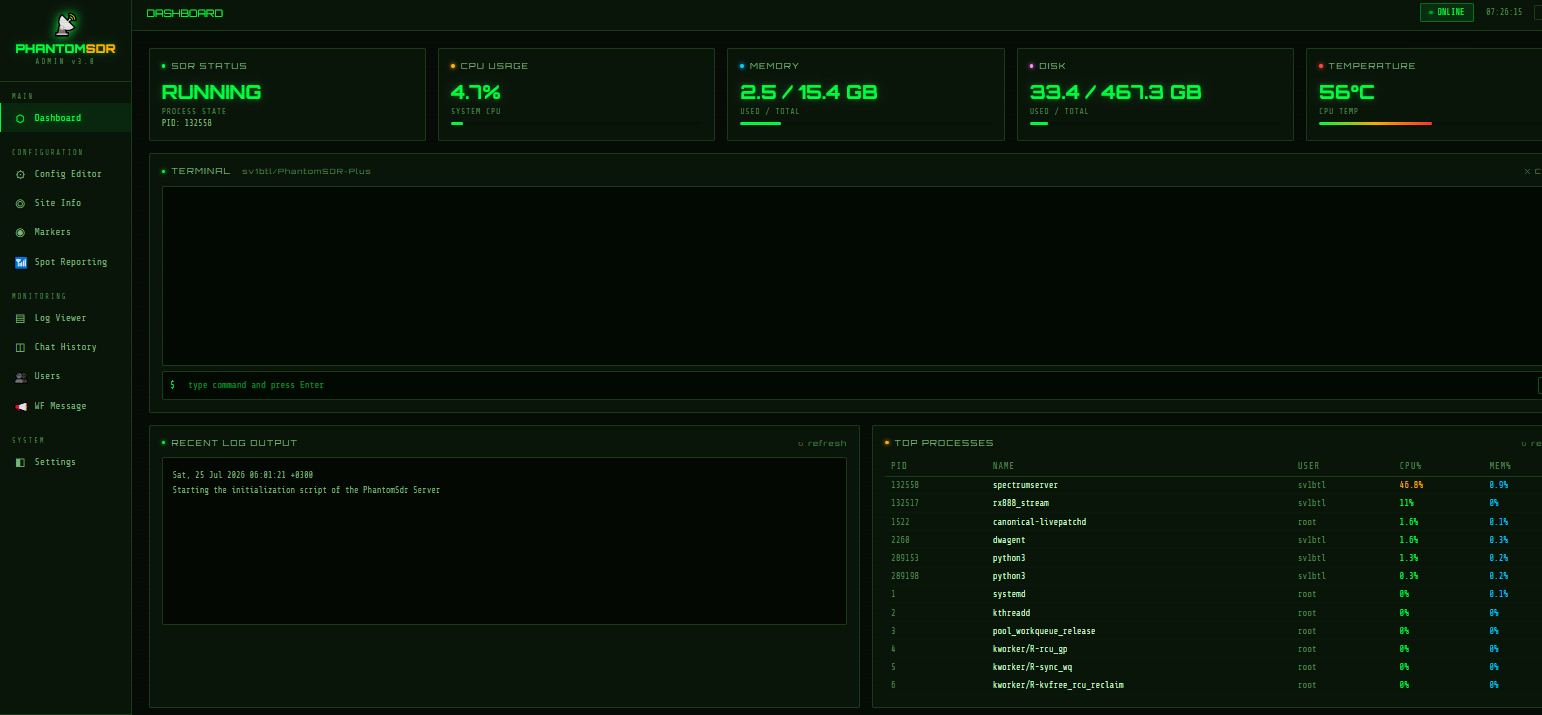
A password-protected control panel, so you never need SSH for day-to-day work.
- Dashboard with server state, CPU, memory, disk and temperature.
- Config and site-information editors, markers, and a command terminal.
- Log viewer, chat history and moderation, messages to listeners on the waterfall.
- Connected users with a kick button, across every receiver.
- Spot-reporting control and graphs of CPU, temperature and users over 24 hours.
An optional statistics server also shows CPU, RAM and temperature on the receiver page itself.
Safe to leave running
🌡️Thermal guard
Thresholds are derived from your own CPU's critical point. The response is staged — warn, lower the clock ceiling, stop the server, and resume once the CPU has been cool for five minutes. It ships in log-only mode, with a test field to prove the whole path before you arm it.
| CPU limit | warn | throttle | stop | resume |
|---|---|---|---|---|
| Intel 100 °C | 88 | 92 | 95 | 75 |
| Ryzen 95 °C | 83 | 87 | 90 | 70 |
| Raspberry Pi 85 °C | 73 | 77 | 80 | 60 |
🛡️Connection limits & flood guard
Cap simultaneous listeners and new connections per address, and bound the silent half-open connections no other limit can see. A refused listener is told why. Off by default.
Below it, setup-firewall.sh adds an optional nftables layer that sheds volume before the server reads a byte — and cannot lock you out of your own machine.
🔀Diversity relay
Listeners can pair your receiver with a second site in their browser; only a classic WebSDR as the partner needs a small relay on your server.
🥝KiwiSDR client emulation
An optional bridge on the same host and port lets AetherSDR, kiwiclient and other Kiwi software use your receiver. Enable it with [kiwi_emulation] enabled = true.
One command, and your site stays yours
update.sh compares your tree with the published one file by file — no git needed — and sorts every file into three kinds:
- Never touched: your configs, markers, admin password, frequency lists, chat and logs.
- Always asked about: start scripts, service units, the band plan — keep mine, take upstream, or both.
- Everything else: updated, after a backup into one dated archive.
It stops the receiver first, starts back exactly what it stopped, and offers to rebuild. recompile.sh rebuilds the backend, the frontend or both on its own.
./update.sh                 # what WOULD change; writes nothing
./update.sh --apply         # do it, asking about your edits
./update.sh --restore LAST # undo the last runupdate.sh once from the repository and let it bring everything else.Measured on real stations
The cost is the band, not the listeners: once the FFT is done, each extra listener costs almost nothing. With OpenCL the GPU takes the heavy part.
| Machine | Receiver & rate | CPU load | Listeners |
|---|---|---|---|
| Ryzen 5 2600 | RX-888 MkII, 64 MHz sampling, 32 MHz IQ | 38–40 % | 50 listeners add under 1 % |
| Radeon RX 580 | RX-888 MkII, 64 MHz sampling, 32 MHz IQ | 28–35 % | should handle many |
| Intel i5-6500T + OpenCL | RX-888 MkII, 60 MHz sampling, 30 MHz IQ | 10–12 % | 100 is no problem |
Ready to build one?
The installation guide covers system preparation, every receiver, the .toml settings, systemd services and troubleshooting.