PhantomSDR-Plus WebSDROne receiver.
Hundreds of listeners.
PhantomSDR-Plus turns a software-defined radio into a WebSDR. Anyone with a browser can tune it, listen, watch the waterfall and decode digital modes — no software to install, no account to make.
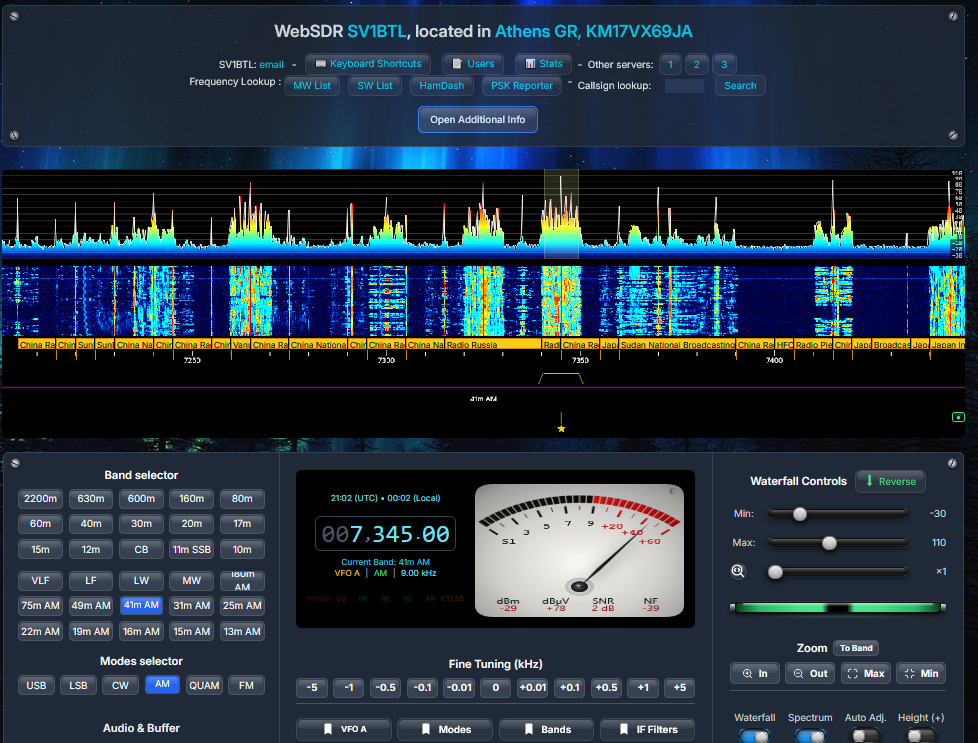
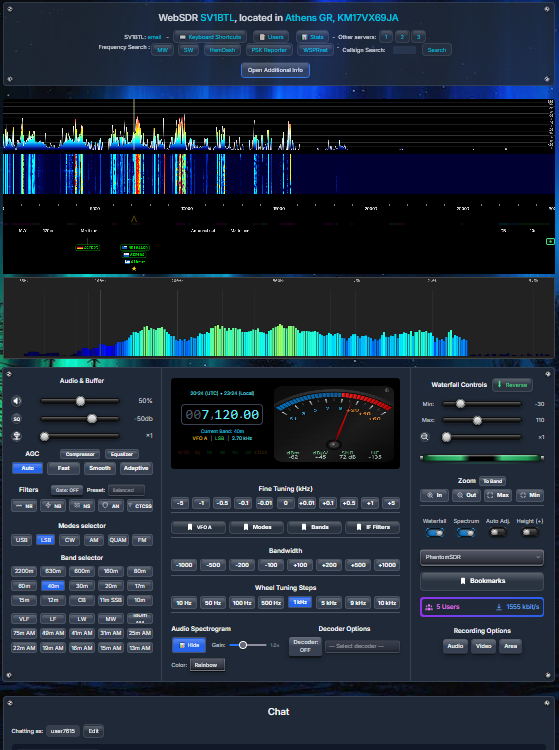
Live demo: the SV1BTL WebSDR in Athens, KM17VX, covering 0–30 MHz.
A complete short-wave station in a browser tab
The server does the heavy lifting once — a single large FFT of the whole band — and every listener gets their own tuning, mode, filter and audio from it. That is why fifty extra listeners cost almost nothing.
📡Tune anything
Click the waterfall, type a frequency, roll the mouse wheel or use the keyboard. AM, synchronous AM, C-QUAM stereo, FM, wide FM, USB, LSB, CW and CW-L.
🎛️Clean audio
Noise reduction, noise blanker, auto notch, background noise suppression, AI noise reduction, AGC, squelch, CTCSS, compressor and equaliser — all adjustable by the listener.
🔣Decode on the spot
FT8, FT4, FT2, JS8, CW, WSPR, QRSS, HF fax, SSTV, NAVTEX, RTTY, PSK31, Olivia and FreeDV RADE — each decoder in its own worker, never in the way of the audio.
📱Phones too
The page adapts to a phone automatically, and a separate light page at /mobile streams only the audio — about half the data of the full view.
🔗Works with your rig
Keep your own transceiver and the receiver in step with TCI-CAT, the CATsync Tool, or two-way rig control in the Desktop PhantomSDR+ application.
🛰️Reports what it hears
A built-in engine decodes FT8, FT4, JS8 and WSPR around the clock and uploads the spots to PSK Reporter and WSPRnet, with no extra software.
What a listener sees
A spectrum and waterfall across the full band with station labels, an analog or digital S-meter, and every control one click away. Click an image to enlarge it.
Several receivers on one computer
One PhantomSDR-Plus machine can now run two or more receivers at the same time — for example an RX-888 for HF and an RTL-SDR for 2 m — each a complete server with its own waterfall, chat, markers and listener list.
🧭A receiver picker on the page
A station with several receivers gets a Receivers: line in the page header with one button each. The proxy sends every request to the right receiver, so they can share a single public port.
➕./add-receiver.sh
Asks which receiver and what it should cover, installs its driver, writes the instance folder and offers to start it. start-all.sh starts them all; stop-websdr.sh <name> stops one.
📶VHF S-units above 30 MHz
Following IARU Region 1, S9 is −93 dBm above 30 MHz and −73 dBm below. The analog needle, the digital bar and the mobile bar switch with the tuned frequency.
🔐CTCSS picker and security fixes
A pop-up with the 49 standard subtones, a tone squelch that no longer opens on noise — and two security fixes in the proxy and the server. Updating is recommended.
Prefer an application to a browser tab?
Desktop PhantomSDR+ keeps a list of the receivers you listen to and opens each in its own window: no address bar or tabs over the waterfall, and audio that keeps playing in the background.
- Rig control (CAT): frequency, mode and filter follow both ways, with built-in drivers or 300+ rigs through Hamlib.
- Also drives KiwiSDR, PA3FWM WebSDR and UberSDR receivers.
- Windows 64/32-bit, Linux .deb and AppImage, Raspberry Pi (arm64 and armhf).
Supported receivers
The installers set up each receiver's complete driver chain. Compatible clones work through SoapySDR.
Put your receiver on the air
One script installs everything on Debian, Ubuntu, Fedora, Arch or openSUSE Tumbleweed — dependencies, the driver for your SDR, the web pages, OpenCL, the admin panel and the RADE decoder.